RAMEENA JALIL
Product Designer

Navigation App
A UX-Driven Redesign for
Safer Routes and Smarter Driving
Overview
Truck drivers operate in high-pressure, high-risk environments where clarity, speed, and trust in tools are critical. This project focused on redesigning a Truck GPS Navigation Android app that suffered from poor usability, high uninstall rates, and low trust among drivers.
The goal was to create a simpler, safer, and more intuitive navigation experience by reducing cognitive load, improving task clarity, and aligning the app with real driver behavior, without adding unnecessary complexity.
Platform: Android
Primary User: Long-haul and local truck drivers
Context of use: On the road, often under time pressure and safety constraints
Scope
I worked as the Product Designer, owning the redesign end-to-end while collaborating closely with product and development teams.
Responsibilities included:
UX audit & heuristic evaluation
Analyzing real user behavior via analytics tools
Redesigning IA and task flows
Creating high-fidelity UI and interaction patterns
Ensuring Figma-to-development consistency
Iterating designs based on technical feasibility and feedback
Team
Me - Product Designer
Product Manager
App Developer
Problem Statement
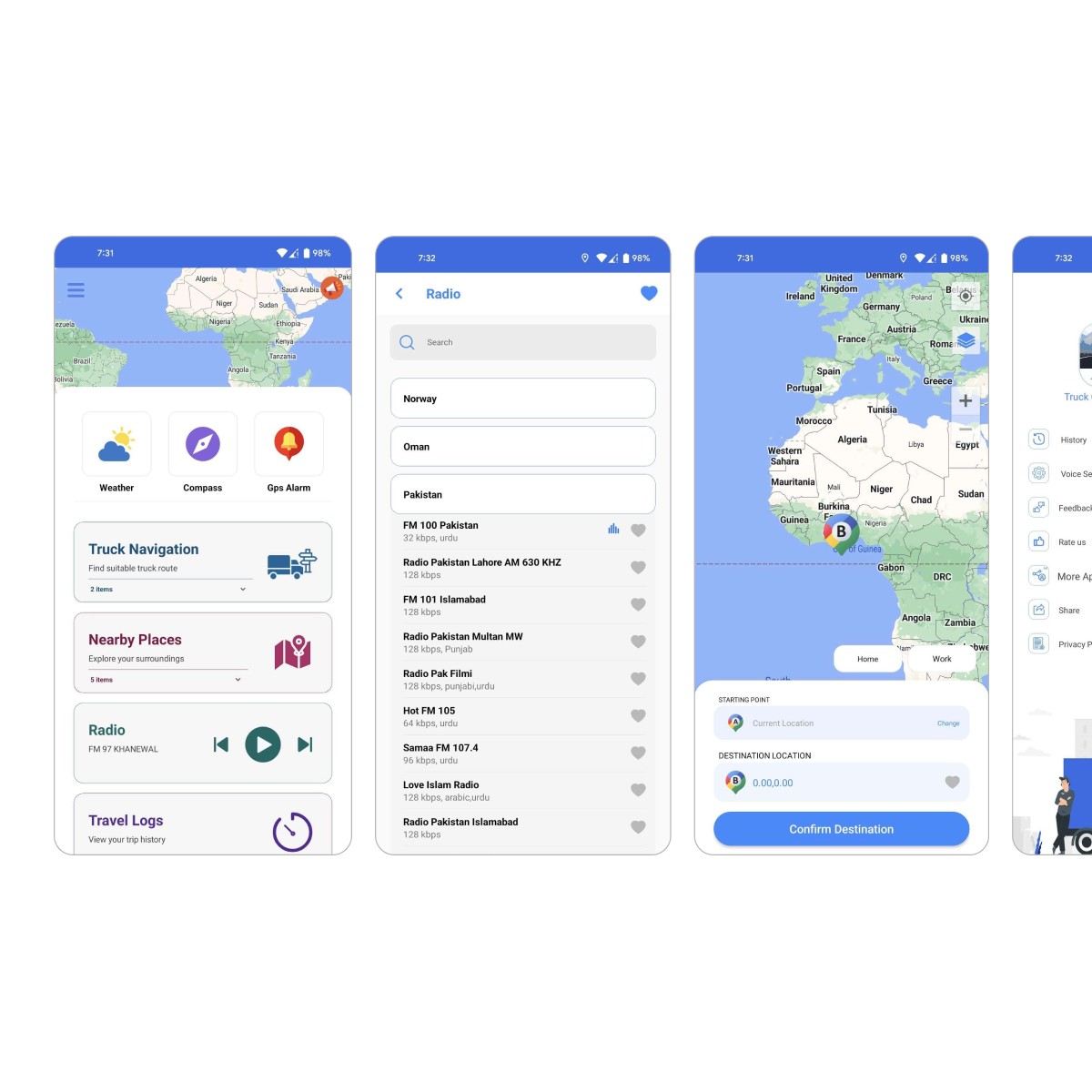
The existing app experience was overwhelming and unintuitive, leading to user frustration and abandonment.
Key issues identified:
Cluttered screens with too many actions competing for attention
Core task (starting navigation) buried inside generic UI elements
High uninstall rate caused by confusion and poor usability
Navigation flows that required unnecessary thinking and scanning
Truck drivers rely on fast, predictable tools. Anything unclear increases stress, reduces trust, and becomes unsafe. The challenge was to redesign the product to meet real-world driving expectations.
Project Goals
Business Goals
Increase app installs, retention, and positive reviews
Improve usage of core features (route calculation, navigation, fuel awareness)
Reduce user errors and support tickets related to route setup
Build a scalable UI system for future Android versions
UX Goals
Simplify the interface and reduce cognitive overload
Make the primary task immediately visible and accessible
Align navigation patterns with familiar mental models
Improve visual clarity and hierarchy
Build user trust through predictability and ease of use
UX Methodology
I followed a lean UX approach, grounded in real data and continuous feedback.
1. Heuristic Evaluation
Audited the existing app against core usability principles, identifying issues related to:
Visual hierarchy
Cognitive load
Touch target sizing
Trust and predictability
2. Analytics & Stakeholder Insights
Combined qualitative and quantitative insights using:
UXCam (session replays, rage clicks, drop-offs)
Firebase (engagement metrics, crashes, feature usage)
Internal discussions with product and development teams
3. Task-Oriented Flow Mapping
Mapped critical user journeys to understand:
Where users hesitated
Where they abandoned tasks
Which steps felt redundant or unclear
4. Design Iteration with Feedback Loops
Design decisions were reviewed weekly with developers to ensure:
Technical feasibility
Clear handoff
Minimal implementation friction
UX Audit: Key Issues Identified
1. Lack of Visual Hierarchy & Clarity
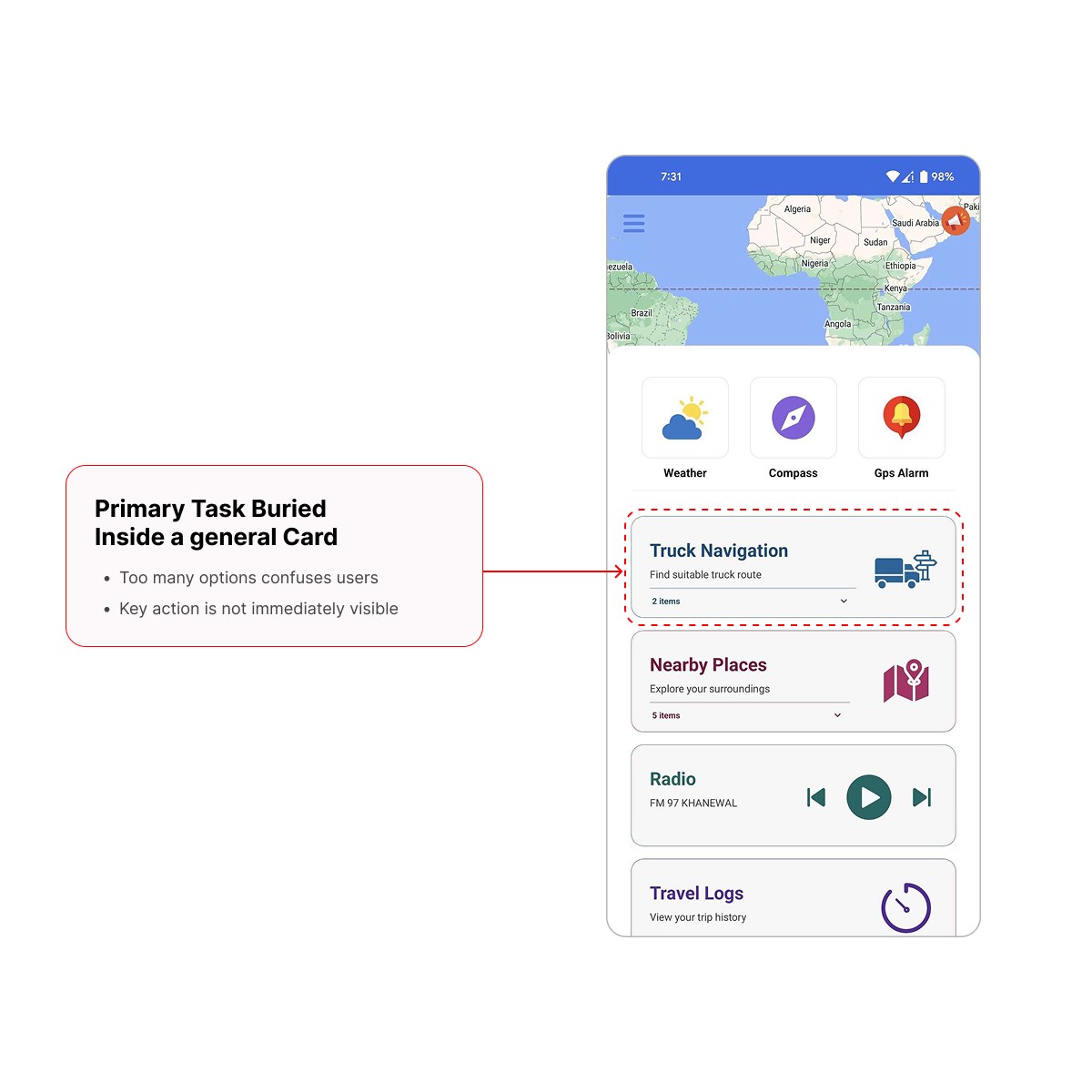
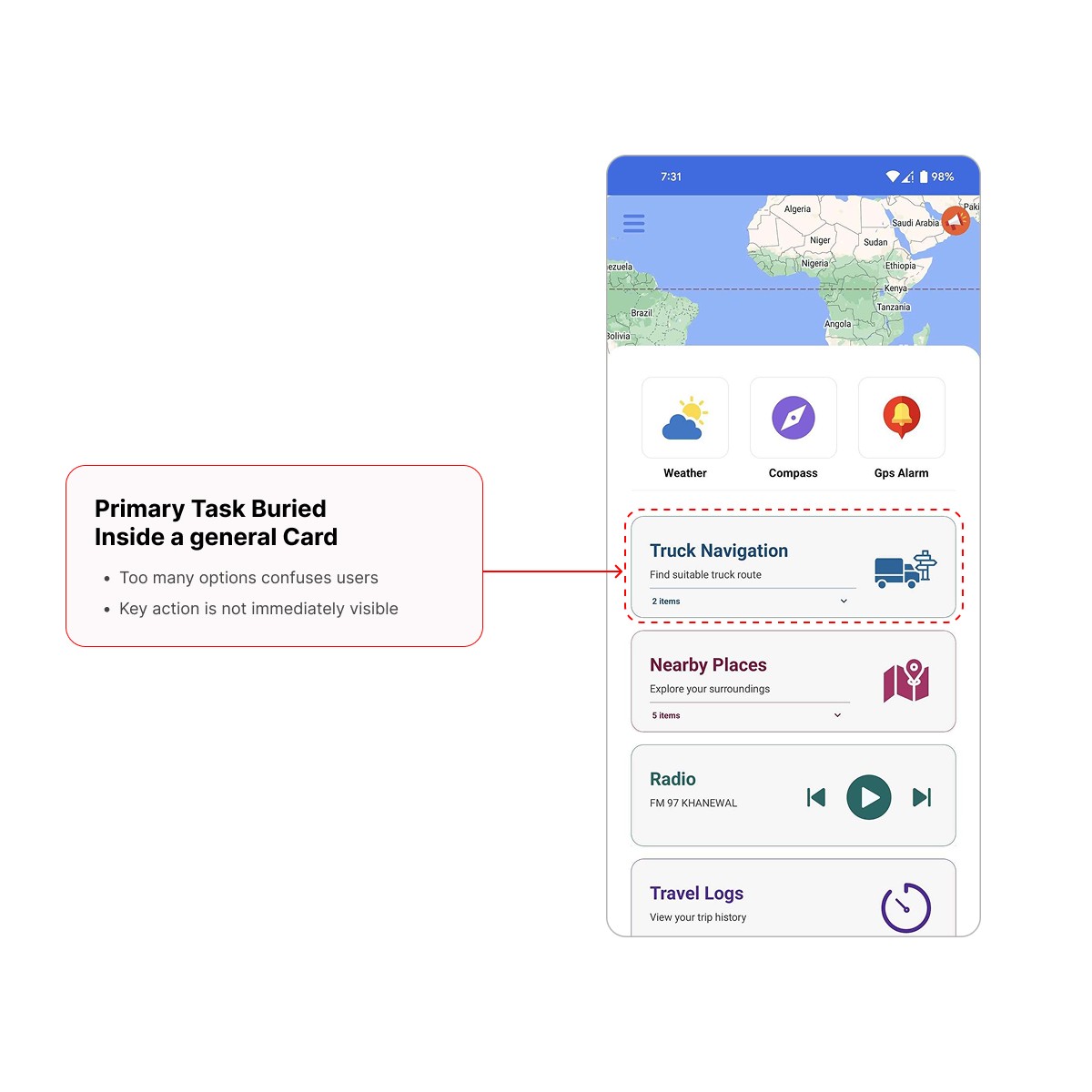
The home screen presented too many options at once. The primary task, starting a route, was hidden inside a general card, forcing users to scan and interpret before acting.
This violated the principle of clarity:
Important actions should be instantly recognizable.
2. Violation of Jakob’s Law
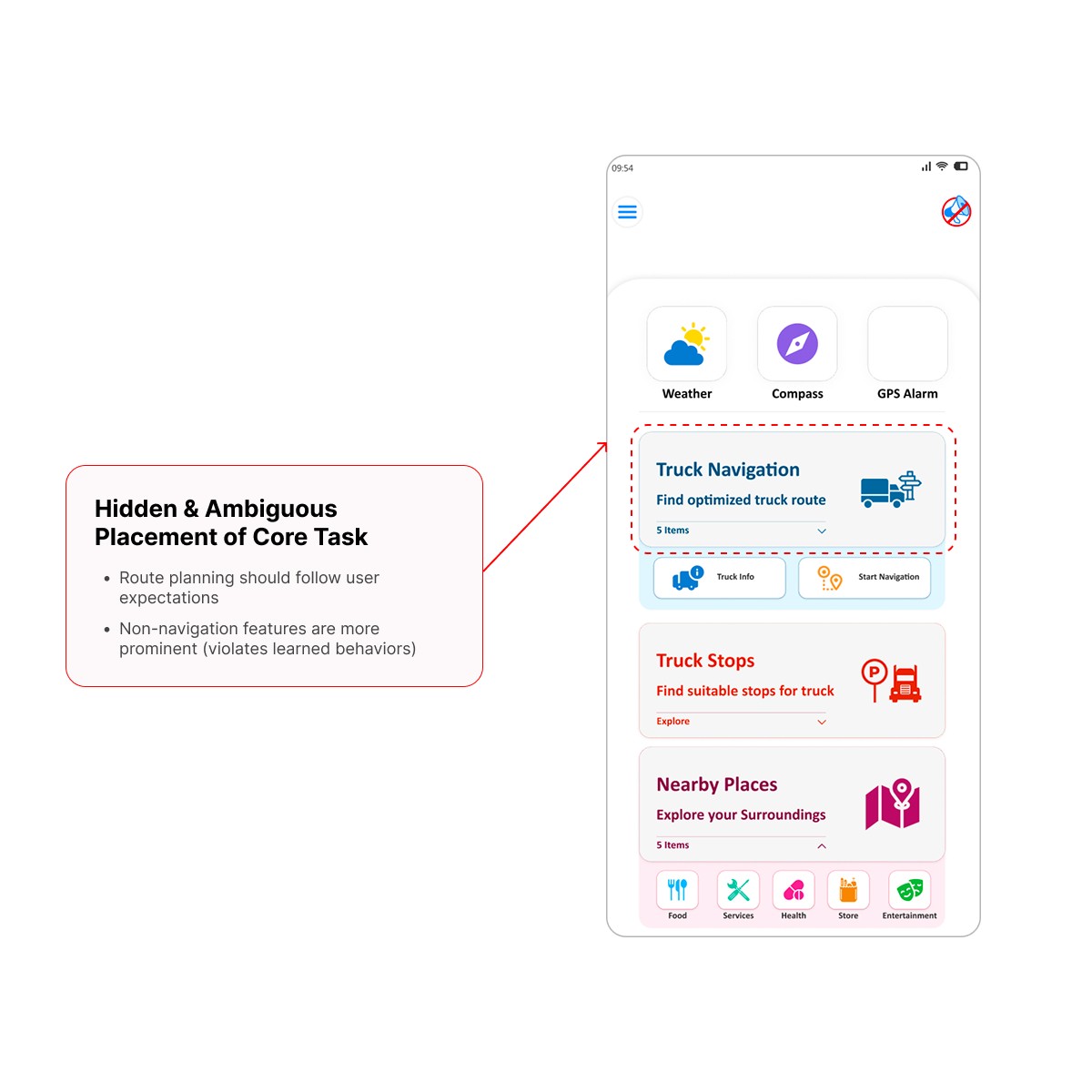
Most users are familiar with navigation apps where route planning is the most prominent action. By hiding this behind unrelated features, the app broke user expectations and increased friction for a core task.
3. Fitts’s Law Misalignment
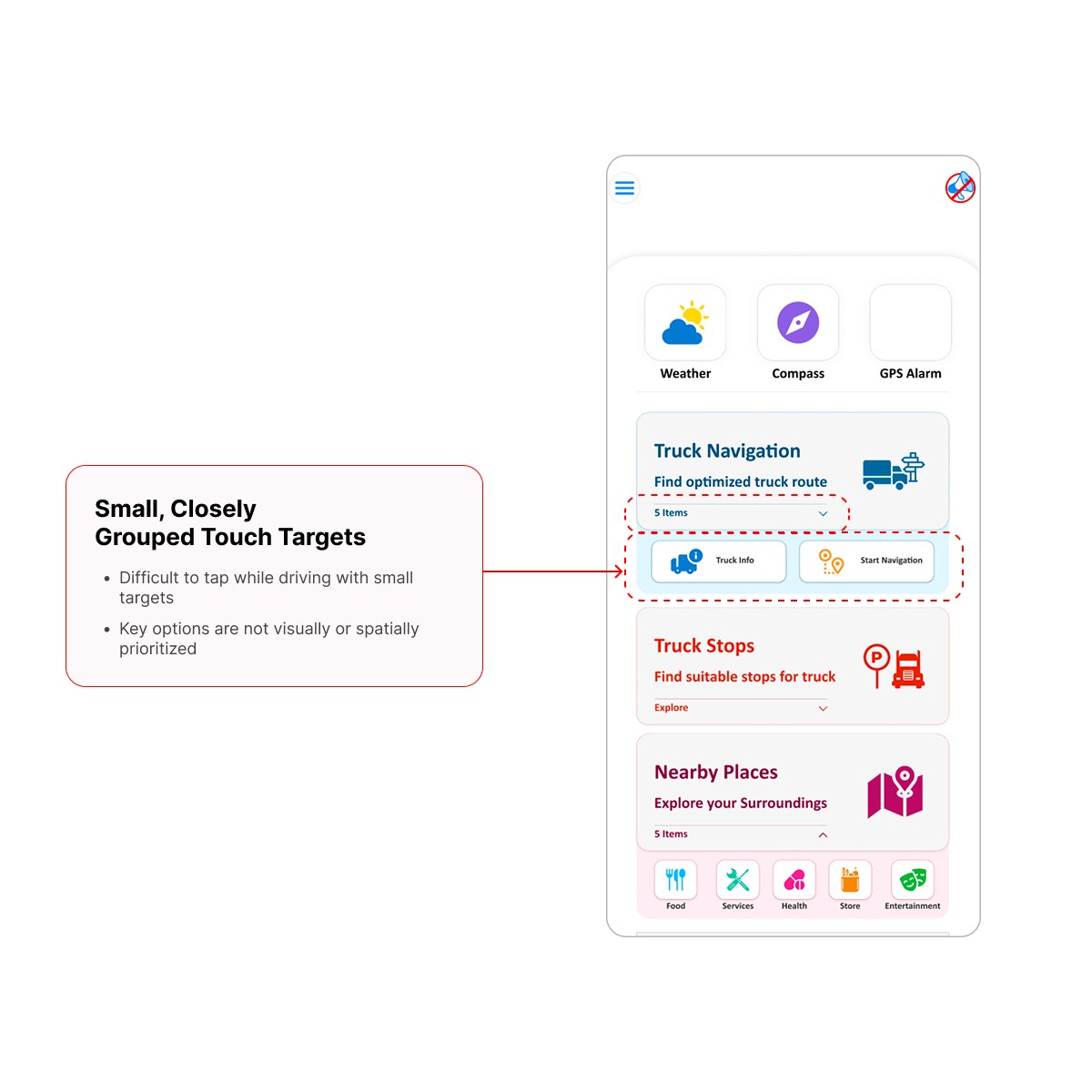
Small, closely grouped touch targets made interaction harder, especially for drivers using the app quickly or with one hand. Core actions were neither visually nor spatially prioritized.
Redesign Strategy
The redesign focused on intent-driven prioritization:
Surface the most important action first
Hide secondary features until needed
Reduce on-screen noise without removing functionality
Core Principles Applied
First Things First: Design around the user’s most urgent intent
Progressive Disclosure: Reveal complexity only when necessary
Recognition over Recall: Make options visible and self-explanatory
User Control: Allow flexibility without forcing decisions
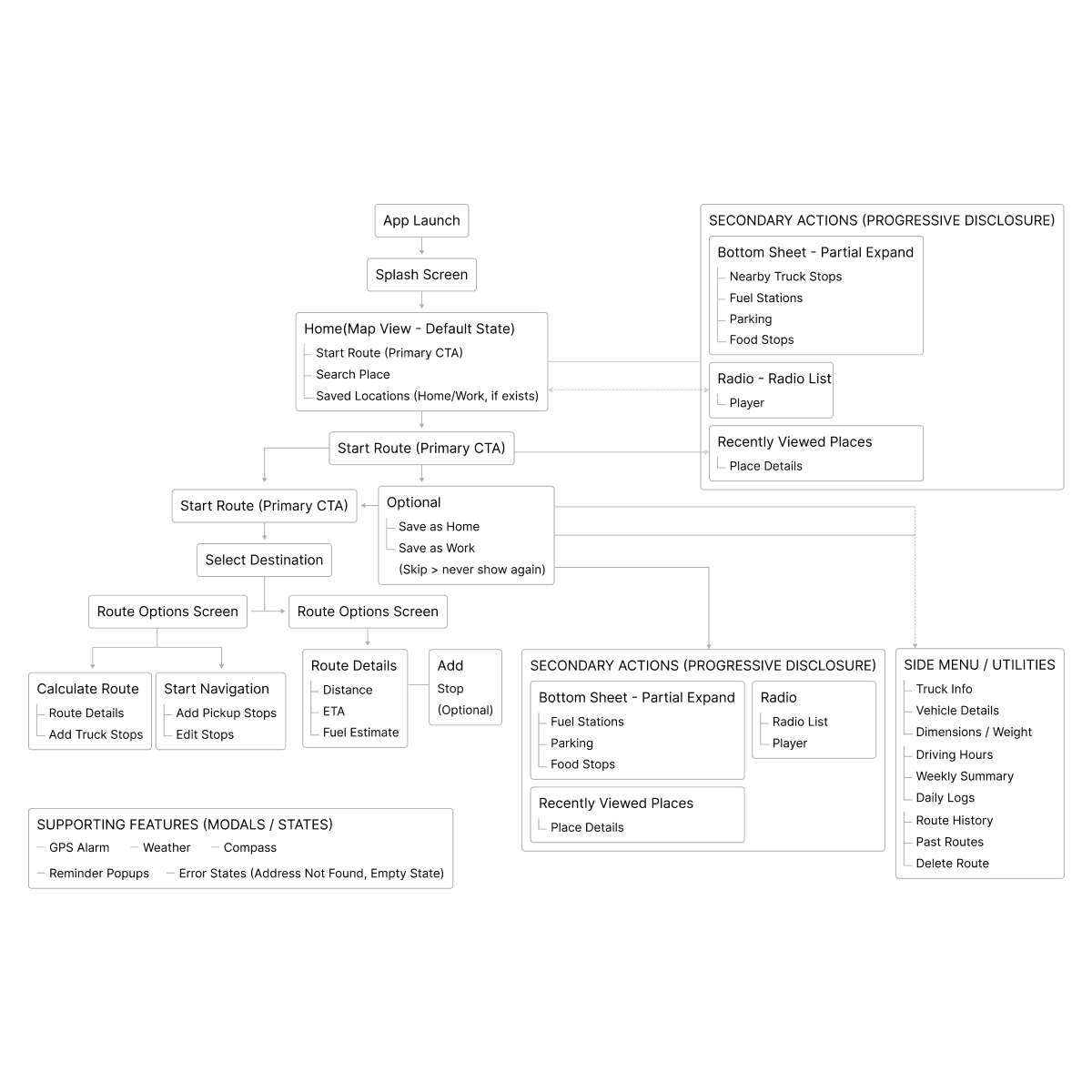
Key Design Decisions
Home Screen: Three Intent-Based States
State 1: Start-Route Focus (Default)
On launch, users see a large, central “Start Route” CTA, the primary reason they open the app.
Supporting tools shown:
Truck Profile
Weather
Compass
These are high-priority checks drivers typically make before driving.
UX Impact:
Reduced decision time
Lower cognitive load
Faster task initiation
State 2: Nearby Truck Stops (Swipe Up)
Secondary needs like fuel stations, parking, food, and rest stops are revealed via a bottom sheet swipe.
Why:
Keeps the default UI clean
Allows exploration without distraction
Principle Applied: Progressive Disclosure
State 3: Radio & Recent Activity (Full Swipe / Tap)
Less critical but useful features (FM radio, recent places) are accessible without cluttering the main screen.
Principle Applied: Recognition over recall
Navigation Flow Redesign
Step 1: Pick Starting Point
Users can choose a starting location via:
Map interaction
Search input
Current location
Optional Personalization Prompt:
If not already saved, users are asked once whether they want to save the location as Home or Work.
If declined, the prompt never appears again
User intent is respected
Step 2: Select Destination
Destination selection follows the same simple, predictable pattern, supporting both map and search input.
UX Principle: Efficiency without intrusion
Step 3: Choose What’s Next
Users are presented with two clear paths:
Option 1: Preview & Calculate Route
For drivers who want more information:
Distance
ETA
Estimated fuel usage
This supports informed decision-making before driving.
Option 2: Start Navigation Immediately
For experienced or returning users:
One tap
No interruptions
Navigation begins instantly
UX Principles Applied:
User control
Recognition over recall
Progressive disclosure
Outcome & Impact
Business Impact
66% increase in installs, growing from ~301k to ~500k users on the Play Store
Improved retention and user trust
Positive internal feedback on design consistency and handoff quality
UX Impact
Fewer support tickets related to route setup errors
Improved user sentiment in reviews (clarity, ease of use)
Faster task completion and reduced hesitation
These results validated the core strategy:
simpler decisions → faster actions → higher trust
Learnings & Reflection
In safety-critical products, clarity beats feature depth
Designing for real behavior (not assumptions) drastically improves outcomes
Progressive disclosure is essential when users operate under cognitive load
Strong UX is not about adding — it’s about removing friction
hello.uxbyray@gmail.com
Some projects are password-protected. If you’d like access or a walkthrough, feel free to contact me via email.
© 2026 Rameena Jalil
RAMEENA JALIL
Product Designer
Navigation App
A UX-Driven Redesign for
Safer Routes and Smarter Driving
Overview
Truck drivers operate in high-pressure, high-risk environments where clarity, speed, and trust in tools are critical. This project focused on redesigning a Truck GPS Navigation Android app that suffered from poor usability, high uninstall rates, and low trust among drivers.
The goal was to create a simpler, safer, and more intuitive navigation experience by reducing cognitive load, improving task clarity, and aligning the app with real driver behavior, without adding unnecessary complexity.
Platform: Android
Primary User: Long-haul and local truck drivers
Context of use: On the road, often under time pressure and safety constraints
Scope
I worked as the Product Designer, owning the redesign end-to-end while collaborating closely with product and development teams.
Responsibilities included:
UX audit & heuristic evaluation
Analyzing real user behavior via analytics tools
Redesigning IA and task flows
Creating high-fidelity UI and interaction patterns
Ensuring Figma-to-development consistency
Iterating designs based on technical feasibility and feedback
Team
Me - Product Designer
Product Manager
App Developer
Problem Statement
This case study covers the design of a 0→1 B2B operations platform built for towing companies to manage dispatching, driver coordination, and job tracking.
Before this product existed, towing companies relied on paper registers, phone calls, and manual follow-ups to assign jobs and track drivers. The lack of real-time visibility led to missed pickups, delayed responses, and operational stress for dispatchers.
The goal of Autoyard was to replace those fragmented workflows with a single, reliable system that towing companies could trust for daily operations.
Project Goals
Business Goals
Increase app installs, retention, and positive reviews
Improve usage of core features (route calculation, navigation, fuel awareness)
Reduce user errors and support tickets related to route setup
Build a scalable UI system for future Android versions
UX Goals
Simplify the interface and reduce cognitive overload
Make the primary task immediately visible and accessible
Align navigation patterns with familiar mental models
Improve visual clarity and hierarchy
Build user trust through predictability and ease of use
UX Methodology
I followed a lean UX approach, grounded in real data and continuous feedback.
1. Heuristic Evaluation
Audited the existing app against core usability principles, identifying issues related to:
Visual hierarchy
Cognitive load
Touch target sizing
Trust and predictability
2. Analytics & Stakeholder Insights
Combined qualitative and quantitative insights using:
UXCam (session replays, rage clicks, drop-offs)
Firebase (engagement metrics, crashes, feature usage)
Internal discussions with product and development teams
3. Task-Oriented Flow Mapping
Mapped critical user journeys to understand:
Where users hesitated
Where they abandoned tasks
Which steps felt redundant or unclear
4. Design Iteration with Feedback Loops
Design decisions were reviewed weekly with developers to ensure:
Technical feasibility
Clear handoff
Minimal implementation friction
UX Audit: Key Issues Identified
1. Lack of Visual Hierarchy & Clarity
The home screen presented too many options at once. The primary task, starting a route, was hidden inside a general card, forcing users to scan and interpret before acting.
This violated the principle of clarity:
Important actions should be instantly recognizable.
2. Violation of Jakob’s Law
Most users are familiar with navigation apps where route planning is the most prominent action. By hiding this behind unrelated features, the app broke user expectations and increased friction for a core task.
3. Fitts’s Law Misalignment
Small, closely grouped touch targets made interaction harder, especially for drivers using the app quickly or with one hand. Core actions were neither visually nor spatially prioritized.
Redesign Strategy
The redesign focused on intent-driven prioritization:
Surface the most important action first
Hide secondary features until needed
Reduce on-screen noise without removing functionality
Core Principles Applied
First Things First: Design around the user’s most urgent intent
Progressive Disclosure: Reveal complexity only when necessary
Recognition over Recall: Make options visible and self-explanatory
User Control: Allow flexibility without forcing decisions
Key Design Decisions
Home Screen: Three Intent-Based States
State 1: Start-Route Focus (Default)
On launch, users see a large, central “Start Route” CTA, the primary reason they open the app.
Supporting tools shown:
Truck Profile
Weather
Compass
These are high-priority checks drivers typically make before driving.
UX Impact:
Reduced decision time
Lower cognitive load
Faster task initiation
State 2: Nearby Truck Stops (Swipe Up)
Secondary needs like fuel stations, parking, food, and rest stops are revealed via a bottom sheet swipe.
Why:
Keeps the default UI clean
Allows exploration without distraction
Principle Applied: Progressive Disclosure
State 3: Radio & Recent Activity (Full Swipe / Tap)
Less critical but useful features (FM radio, recent places) are accessible without cluttering the main screen.
Principle Applied: Recognition over recall
Navigation Flow Redesign
Step 1: Pick Starting Point
Users can choose a starting location via:
Map interaction
Search input
Current location
Optional Personalization Prompt:
If not already saved, users are asked once whether they want to save the location as Home or Work.
If declined, the prompt never appears again
User intent is respected
Step 2: Select Destination
Destination selection follows the same simple, predictable pattern, supporting both map and search input.
UX Principle: Efficiency without intrusion
Step 3: Choose What’s Next
Users are presented with two clear paths:
Option 1: Preview & Calculate Route
For drivers who want more information:
Distance
ETA
Estimated fuel usage
This supports informed decision-making before driving.
Option 2: Start Navigation Immediately
For experienced or returning users:
One tap
No interruptions
Navigation begins instantly
UX Principles Applied:
User control
Recognition over recall
Progressive disclosure
Outcome & Impact
Business Impact
66% increase in installs, growing from ~301k to ~500k users on the Play Store
Improved retention and user trust
Positive internal feedback on design consistency and handoff quality
UX Impact
Simplify the interface and reduce cognitive overload
Make the primary task immediately visible and accessible
Align navigation patterns with familiar mental models
Improve visual clarity and hierarchy
Build user trust through predictability and ease of use
These results validated the core strategy:
simpler decisions → faster actions → higher trust
Learnings & Reflection
This project reinforced the importance of:
Designing for reliability before optimization
Making deliberate constraints early
Prioritizing operational clarity over feature density
If scaling further, the next focus areas would be:
Analytics once data quality is stable
Exception handling for missed or delayed pickups
Carefully introducing automation without reducing trust
hello.uxbyray@gmail.com
Some projects are password-protected. If you’d like access or a walkthrough, feel free to contact me via email.
© 2026 Rameena Jalil
RAMEENA JALIL
Product Designer
Navigation App
A UX-Driven Redesign for
Safer Routes and Smarter Driving
Overview
Truck drivers operate in high-pressure, high-risk environments where clarity, speed, and trust in tools are critical. This project focused on redesigning a Truck GPS Navigation Android app that suffered from poor usability, high uninstall rates, and low trust among drivers.
The goal was to create a simpler, safer, and more intuitive navigation experience by reducing cognitive load, improving task clarity, and aligning the app with real driver behavior, without adding unnecessary complexity.
Platform: Android
Primary User: Long-haul and local truck drivers
Context of use: On the road, often under time pressure and safety constraints
Scope
I worked as the Product Designer, owning the redesign end-to-end while collaborating closely with product and development teams.
Responsibilities included:
UX audit & heuristic evaluation
Analyzing real user behavior via analytics tools
Redesigning IA and task flows
Creating high-fidelity UI and interaction patterns
Ensuring Figma-to-development consistency
Iterating designs based on technical feasibility and feedback
Team
Me - Product Designer
Product Manager
App Developer
Problem Statement
This case study covers the design of a 0→1 B2B operations platform built for towing companies to manage dispatching, driver coordination, and job tracking.
Before this product existed, towing companies relied on paper registers, phone calls, and manual follow-ups to assign jobs and track drivers. The lack of real-time visibility led to missed pickups, delayed responses, and operational stress for dispatchers.
The goal of Autoyard was to replace those fragmented workflows with a single, reliable system that towing companies could trust for daily operations.
Project Goals
Business Goals
Increase app installs, retention, and positive reviews
Improve usage of core features (route calculation, navigation, fuel awareness)
Reduce user errors and support tickets related to route setup
Build a scalable UI system for future Android versions
UX Goals
Simplify the interface and reduce cognitive overload
Make the primary task immediately visible and accessible
Align navigation patterns with familiar mental models
Improve visual clarity and hierarchy
Build user trust through predictability and ease of use
UX Methodology
I followed a lean UX approach, grounded in real data and continuous feedback.
1. Heuristic Evaluation
Audited the existing app against core usability principles, identifying issues related to:
Visual hierarchy
Cognitive load
Touch target sizing
Trust and predictability
2. Analytics & Stakeholder Insights
Combined qualitative and quantitative insights using:
UXCam (session replays, rage clicks, drop-offs)
Firebase (engagement metrics, crashes, feature usage)
Internal discussions with product and development teams
3. Task-Oriented Flow Mapping
Mapped critical user journeys to understand:
Where users hesitated
Where they abandoned tasks
Which steps felt redundant or unclear
4. Design Iteration with Feedback Loops
Design decisions were reviewed weekly with developers to ensure:
Technical feasibility
Clear handoff
Minimal implementation friction
UX Audit: Key Issues Identified
1. Lack of Visual Hierarchy & Clarity
The home screen presented too many options at once. The primary task, starting a route, was hidden inside a general card, forcing users to scan and interpret before acting.
This violated the principle of clarity:
Important actions should be instantly recognizable.
2. Violation of Jakob’s Law
Most users are familiar with navigation apps where route planning is the most prominent action. By hiding this behind unrelated features, the app broke user expectations and increased friction for a core task.
3. Fitts’s Law Misalignment
Small, closely grouped touch targets made interaction harder, especially for drivers using the app quickly or with one hand. Core actions were neither visually nor spatially prioritized.
Redesign Strategy
The redesign focused on intent-driven prioritization:
Surface the most important action first
Hide secondary features until needed
Reduce on-screen noise without removing functionality
Core Principles Applied
First Things First: Design around the user’s most urgent intent
Progressive Disclosure: Reveal complexity only when necessary
Recognition over Recall: Make options visible and self-explanatory
User Control: Allow flexibility without forcing decisions
Key Design Decisions
Home Screen: Three Intent-Based States
State 1: Start-Route Focus (Default)
On launch, users see a large, central “Start Route” CTA, the primary reason they open the app.
Supporting tools shown:
Truck Profile
Weather
Compass
These are high-priority checks drivers typically make before driving.
UX Impact:
Reduced decision time
Lower cognitive load
Faster task initiation
State 2: Nearby Truck Stops (Swipe Up)
Secondary needs like fuel stations, parking, food, and rest stops are revealed via a bottom sheet swipe.
Why:
Keeps the default UI clean
Allows exploration without distraction
Principle Applied: Progressive Disclosure
State 3: Radio & Recent Activity (Full Swipe / Tap)
Less critical but useful features (FM radio, recent places) are accessible without cluttering the main screen.
Principle Applied: Recognition over recall
Navigation Flow Redesign
Step 1: Pick Starting Point
Users can choose a starting location via:
Map interaction
Search input
Current location
Optional Personalization Prompt:
If not already saved, users are asked once whether they want to save the location as Home or Work.
If declined, the prompt never appears again
User intent is respected
Step 2: Select Destination
Destination selection follows the same simple, predictable pattern, supporting both map and search input.
UX Principle: Efficiency without intrusion
Step 3: Choose What’s Next
Users are presented with two clear paths:
Option 1: Preview & Calculate Route
For drivers who want more information:
Distance
ETA
Estimated fuel usage
This supports informed decision-making before driving.
Option 2: Start Navigation Immediately
For experienced or returning users:
One tap
No interruptions
Navigation begins instantly
UX Principles Applied:
User control
Recognition over recall
Progressive disclosure
Outcome & Impact
Business Impact
66% increase in installs, growing from ~301k to ~500k users on the Play Store
Improved retention and user trust
Positive internal feedback on design consistency and handoff quality
UX Impact
Simplify the interface and reduce cognitive overload
Make the primary task immediately visible and accessible
Align navigation patterns with familiar mental models
Improve visual clarity and hierarchy
Build user trust through predictability and ease of use
These results validated the core strategy:
simpler decisions → faster actions → higher trust
Learnings & Reflection
This project reinforced that in real marketplace products, trust is a design responsibility, not a visual layer.
Designing with restraint, choosing clarity over feature volume; proved more effective in reducing hesitation.
If extended further, usability testing and behavioral analytics would be used to validate assumptions and refine trust mechanisms.
hello.uxbyray@gmail.com
Some projects are password-protected. If you’d like access or a walkthrough, feel free to contact me via email.
© 2026 Rameena Jalil